How to Check Traffic Challan Status Online by Vehicle Number
Traffic challans are increasingly issued digitally for violations such as speeding, jumping a red light, driving without valid documents, or breaking other traffic rules. Because many challans are generated through traffic cameras and electronic enforcement systems, vehicle owners may not always know immediately that a challan has been issued.
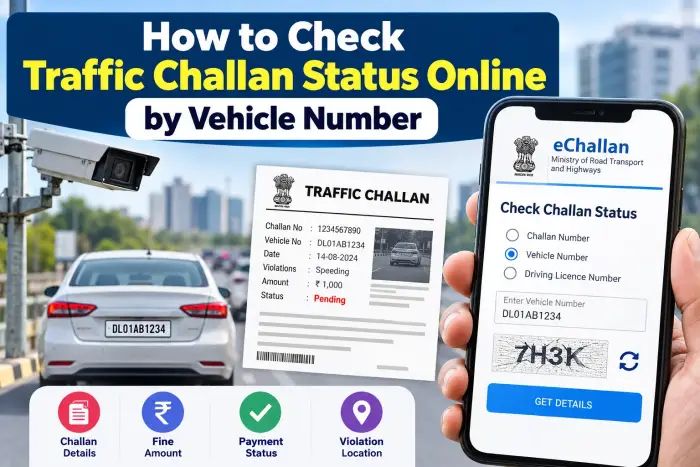
The good news is that you can check your traffic challan status online using your vehicle number. The official eChallan system operated under the Ministry of Road Transport and Highways allows users to search for pending challans using details such as a vehicle number, challan number, or driving licence number.
What Is an e-Challan?
An e-Challan is a digitally generated traffic challan issued by traffic police or transport authorities when a vehicle or driver is found violating applicable traffic rules.
Depending on the violation and available records, the challan information may include the vehicle registration number, challan date, fine amount, issuing department and current payment status.
Traffic Challan Check – Quick Overview
| Details | Information |
|---|---|
| Service | Online Traffic Challan Check |
| Search Using | Vehicle Number, Challan Number or DL Number |
| Information Available | Challan Details, Amount and Status |
| Payment | Online payment may be available |
| Receipt | Available after successful payment |
| Main Requirement | Correct Vehicle Registration Number |
| Service Type | Online |
How to Check Traffic Challan Status by Vehicle Number
Checking a traffic challan online generally takes only a few minutes.
Step 1: Open the Official eChallan Service
Visit the official eChallan service of the Ministry of Road Transport and Highways.
Always make sure that you are using an authentic government service rather than an unknown website or link.
Step 2: Select “Check Challan Status”
Find the option for checking challan status.
The official system currently allows challan searches using:
Challan Number
Vehicle Number
Driving Licence Number
Step 3: Enter Your Vehicle Number
Select the Vehicle Number option and enter your registration number carefully.
For example:
AB01CD1234
Make sure there are no typing mistakes, because an incorrect registration number may return no matching challan.
Step 4: Complete the Verification
Enter the CAPTCHA or other verification information displayed on the page and proceed to get the details.
Step 5: Check Your Challan Details
If a challan is available for the entered vehicle, the system may display information such as:
Challan number
Vehicle/RC number
Challan date
Challan amount
Challan status
State
Issuing department
Challan location
You can then check whether the challan is pending, paid or requires further action.
How to Pay a Pending Traffic Challan Online
If online payment is available for your challan, you may see an option to proceed with payment after opening the challan details. The official eChallan service supports online payment for eligible pending challans.
Follow the instructions displayed on the payment page and verify all challan details before paying.
After completing the transaction, save the transaction reference or payment information for future use.
How to Download a Challan Payment Receipt
After successful payment, users may also be able to search for and download the payment receipt.
The official system provides a payment-receipt search facility using information such as the challan number, vehicle number or driving licence number. Only successfully paid challans are shown in the payment-receipt section.
Keeping the receipt can be useful if the payment status does not update immediately.
Payment Done but Challan Still Showing Pending?
Sometimes a payment may be completed but the challan status may take time to update.
Instead of immediately making another payment, check the transaction status first.
The eChallan system includes a pending transaction facility where users can search using details including the challan number or vehicle number and verify payment status.
Making duplicate payments without checking the previous transaction may create unnecessary complications.
Why Should You Check Your Vehicle Challan Regularly?
Checking your challan status occasionally can help you identify pending traffic fines before they are forgotten.
It is especially useful when:
You recently travelled through areas with traffic cameras.
You are planning to buy or sell a used vehicle.
You received a traffic violation message.
You want to verify whether an earlier payment was successful.
You want to check outstanding vehicle-related issues.
Checking pending challans can also be useful before purchasing a second-hand vehicle.
Be Careful of Fake Challan Messages
Vehicle owners should be cautious about suspicious SMS messages, WhatsApp messages, apps or websites claiming that an urgent challan payment is required.
The official eChallan portal warns users about fraudulent websites and mobile apps impersonating eChallan services. It also states that users should not share passwords, OTPs, payment details or sensitive personal information through suspicious calls, messages, emails or links.
Always verify the challan independently through an official service before making payment.
Frequently Asked Questions
Can I check a traffic challan using only my vehicle number?
Yes. The official eChallan service provides an option to search for challan information using the vehicle number.
Can I check a challan using my driving licence number?
Yes. Challan searches may also be performed using a driving licence number.
Can I pay my traffic challan online?
Eligible pending challans may provide an online payment option through the eChallan system.
How can I know whether my challan payment was successful?
You can check the transaction status through the official payment-verification or pending-transaction facility.
Can I download my challan payment receipt?
Yes. Successfully paid challans may be searched in the payment-receipt section, where the corresponding receipt can be downloaded.
What should I do if no challan is found?
First, confirm that the vehicle number has been entered correctly. If there is still no result, there may be no matching challan in the system for the details entered.
Conclusion
Checking your traffic challan status online by vehicle number is a simple way to find pending traffic fines without visiting an office. By entering your registration number in the official eChallan system, you can check challan details, fine amounts and payment status.
Always verify that you are using an official service before entering vehicle or payment information, and keep your payment receipt or transaction reference after paying a challan.