Check Vehicle Details Online by Number – RC, Challan, Insurance & FASTag Guide
Checking important vehicle information has become much easier with online services. Using your vehicle registration number, you can access or verify several useful records, including registration information, RC status, pending traffic challans, insurance validity and FASTag status.
These checks can be useful not only for existing vehicle owners but also when buying a used car or bike. Instead of depending on one document, you can verify different vehicle-related records through official digital services such as VAHAN, mParivahan, eChallan and FASTag platforms.
This guide explains how to check vehicle details online by number and covers RC information, traffic challans, car insurance, insurance renewal, policy comparison and FASTag balance/status.
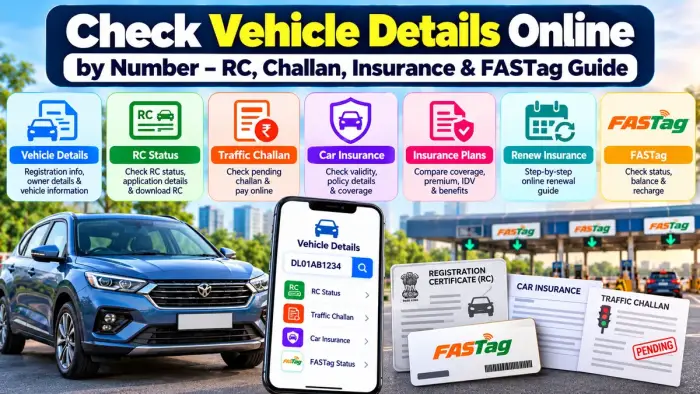
Vehicle Details Online – Quick Overview
| Service | What You Can Check |
|---|---|
| Vehicle Details | Registration and available vehicle information |
| RC Status | Registration Certificate and application status |
| Traffic Challan | Pending challan, amount and payment status |
| Car Insurance | Insurance validity and policy information |
| Insurance Plans | Coverage, IDV, premium and benefits |
| Insurance Renewal | Expiry date, NCB, add-ons and renewal |
| FASTag | Tag status, balance and recharge information |
VAHAN currently provides citizen services including Know Your Vehicle Details, RC-related services and status facilities.
1. How to Check Vehicle Details by Number
Your vehicle registration number is one of the easiest ways to start checking vehicle information online.
For example:
DL01AB1234
You can use supported VAHAN or mParivahan services to look up available information connected with the registration record.
Depending on the service and authentication required, vehicle information may include details related to:
Registration
Vehicle category
Fuel type
Registration validity
Vehicle-related services
RC information
Insurance validity
Other available transport records
mParivahan currently brings together VAHAN, Sarathi and eChallan-related services and also supports Virtual RC functionality.
Always use official services when entering vehicle or personal information.
2. How to Check RC Status Online
The Registration Certificate (RC) confirms that a vehicle is registered with the appropriate transport authority.
If you recently applied for an RC-related service, VAHAN allows application-status searches using either an application number or vehicle registration number.
Basic RC Status Check Process
Open the official VAHAN citizen service.
Enter your vehicle registration number.
Select the relevant RC or status service.
Complete the requested verification.
View the available registration or application information.
The VAHAN citizen portal currently includes RC-related services, vehicle services, document downloads and status facilities.
Related Guide
How to Check RC Status Online – Registration Certificate Details & Download Guide
Use this detailed article when you want to explain RC checking and digital RC access separately.
3. How to Check Traffic Challan Status Online
A traffic challan may be issued for offences such as speeding, signal violations or other applicable traffic-rule violations.
The official eChallan system allows users to check pending challans using:
Challan number
Vehicle number
Driving licence number
The result can include the challan number, RC number, challan date, amount, status, state, department and challan location.
Steps to Check Challan by Vehicle Number
Open the official eChallan service.
Choose Vehicle Number.
Enter the registration number.
Complete CAPTCHA verification.
Select Get Detail.
Review any available pending challans.
Eligible pending challans can also be paid through the official eChallan system, while successfully paid challans can have receipts downloaded online.
Related Guide
How to Check Traffic Challan Status Online by Vehicle Number
This can be internally linked for users who specifically want challan details.
4. How to Check Car Insurance Online
Vehicle owners should also keep track of their car insurance validity and policy details.
Your insurance policy document or insurer's official website/app is generally the best place to check detailed information such as:
Policy number
Start date
Expiry date
Policy type
IDV
Add-ons
Deductibles
Premium
Coverage terms
For basic vehicle-related information, mParivahan and associated transport records can also be useful.
Why Check Insurance Regularly?
You should check insurance when:
Your renewal date is approaching
You cannot locate your policy document
You are buying a used car
You want to verify policy validity
You want to check coverage before making a claim
Third-party liability insurance is a key component of motor insurance requirements, while broader policies can provide own-damage protection depending on the plan. IRDAI provides guidance on motor insurance coverage and renewal.
Related Guide
How to Check Car Insurance Online – Coverage, Renewal Date & Policy Details
5. How to Compare the Best Car Insurance Plans
The cheapest premium is not necessarily the best insurance option.
When comparing policies, consider several factors together.
| Factor | What to Check |
|---|---|
| Policy Type | Third-party, own-damage or broader package cover |
| Premium | Total amount payable |
| IDV | Insured value of the car |
| Deductible | Amount payable by you during applicable claims |
| Add-ons | Optional extra protections |
| NCB | Eligible No Claim Bonus |
| Garage Network | Nearby cashless repair options |
| Exclusions | Situations the policy does not cover |
Common Insurance Options
Third-Party Cover: Primarily deals with applicable third-party liability.
Own-Damage Cover: Provides protection for eligible loss or damage to the insured vehicle, subject to policy terms.
Package/Comprehensive Cover: Generally combines third-party liability and own-damage protection.
Optional add-ons can provide additional benefits depending on the policy.
IRDAI describes add-on covers as additional protection that can be purchased with applicable motor policies.
Related Guide
Best Car Insurance Plans – Compare Coverage, Premium & Benefits
This can be linked from your insurance section for users who are considering purchasing or switching policies.
6. How to Renew Car Insurance Online
Most insurers now allow customers to complete much of the renewal process online.
Before renewal, check:
Existing policy expiry date
Vehicle details
IDV
Current coverage
No Claim Bonus
Deductibles
Add-ons
Final premium
Basic Online Renewal Process
Visit your insurer's official website or app.
Enter your vehicle or policy details.
Verify your existing policy.
Review the coverage.
Check IDV and eligible NCB.
Select any required add-ons.
Review the final premium.
Make payment securely.
Download the renewed policy.
IRDAI advises policyholders to approach their insurer at least 15 days before the existing policy expires.
Renewing early gives you enough time to review the policy instead of making a rushed decision on the expiry date.
Related Guide
How to Renew Car Insurance Online – Step-by-Step Guide
7. How to Check FASTag Status and Balance
FASTag is an RFID-based electronic toll-payment system. The tag is attached to the vehicle and toll charges are deducted from its linked prepaid or bank account arrangement.
NPCI states that FASTag is vehicle-specific and should not be transferred from one vehicle to another. If sufficient prepaid balance is not maintained, a tag can be blacklisted at the toll plaza.
What You Should Check Before Travelling
FASTag is active
Correct vehicle is linked
Sufficient balance is available
Tag is not blacklisted
Recent recharge has been updated
FASTag status can be checked through supported official services, while balance and transaction information can generally be accessed through the issuing bank or supported FASTag application.
Related Guide
How to Check FASTag Status and Balance Using Vehicle Number
This detailed article can cover status checking, recharge, blacklisting and transaction history.
Important Checks Before Buying a Used Vehicle
Online vehicle verification becomes particularly useful when purchasing a second-hand car.
Before completing a purchase, consider checking:
Registration and RC details
Pending traffic challans
Insurance validity
Vehicle and registration information
FASTag status
Ownership-transfer requirements
Other applicable documentation
Online information should be treated as one part of the verification process. Always inspect original documents and complete the legally required ownership-transfer procedure.
VAHAN specifically provides ownership-transfer and other vehicle-related citizen services.
Avoid Fake Vehicle and Challan Websites
Vehicle numbers, RC details, insurance information and payment credentials should be handled carefully.
The official eChallan portal specifically warns users about fraudulent websites and mobile apps impersonating eChallan services and states that it does not request passwords, OTPs or payment details through unsolicited calls, emails, messages or links.
For safer online checks:
Use official transport portals
Use your insurer's official website/app
Never share OTPs with unknown callers
Avoid unknown APK files
Verify suspicious challan messages independently
Check the website before making payments
Frequently Asked Questions
Can I check vehicle details using the registration number?
Yes. VAHAN and mParivahan provide vehicle-related services using registration information, although the exact details shown can depend on the service and authentication required.
Can I check pending challans by vehicle number?
Yes. The official eChallan service allows pending challan searches using a vehicle number.
Can I check RC application status online?
Yes. VAHAN's application-status service supports searches using an application number or vehicle registration number.
Can I check my car insurance expiry date online?
You can check detailed policy dates through your insurer's official portal or policy document. Vehicle-related digital services may also show available insurance-validity information.
How early should I renew car insurance?
IRDAI recommends approaching the insurance company at least 15 days before policy expiry.
Is the cheapest car insurance plan always better?
No. Compare coverage, IDV, deductibles, add-ons, exclusions, premium and claims-related services before choosing a policy.
Can FASTag become blacklisted because of low balance?
For prepaid FASTags, NPCI states that inadequate balance can lead to the tag being blacklisted at a toll plaza.
Can I use one FASTag on another vehicle?
No. NPCI states that FASTag is vehicle-specific and cannot be transferred to another vehicle after being affixed.
Conclusion
A vehicle registration number can help you access several useful online services related to your car or bike. You can check vehicle and RC information, traffic challans, insurance details and FASTag status, while separate online services also make it easier to compare and renew car insurance.
For complete vehicle management, regularly verify your RC, insurance expiry date, pending challans and FASTag before travelling. When buying a used vehicle, these checks become even more important.
Use official VAHAN, mParivahan, eChallan, insurer and FASTag services whenever possible, and avoid entering sensitive information or making payments through suspicious links.