మీ ఫోటోను 80s Lookగా మార్చండి: 5 Best Apps, AI Prompts మరియు Complete Guide
మీరు ఎప్పుడైనా ఆలోచించారా—ఈరోజు తీసుకున్న మీ ఫోటో 1985లో తీసి ఉంటే ఎలా కనిపించేదో?
80s కాలానికి ప్రత్యేకమైన warm colors, film grain, faded tones, camera flash, vintage hairstyles మరియు retro backgrounds ఇప్పుడు మళ్లీ ట్రెండ్ అవుతున్నాయి. మంచి విషయం ఏమిటంటే, ఇలాంటి look కోసం పాత film camera లేదా professional photo editing skills అవసరం లేదు.
ఇప్పుడు AI photo editing apps, online photo editors, premium image enhancement tools మరియు generative AI సహాయంతో సాధారణ smartphone photoని కొన్ని నిమిషాల్లోనే 80s-style imageగా మార్చవచ్చు.
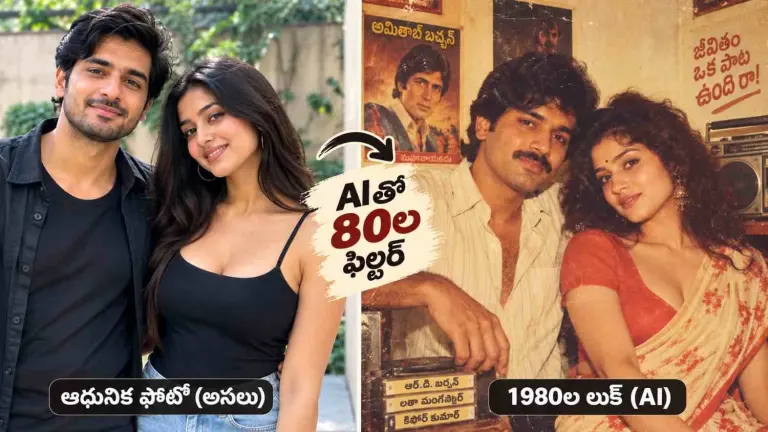
క్రింద 5 ఉపయోగకరమైన apps మరియు ready-to-use AI prompts ఇచ్చాం.
80s Look కోసం Best Apps
| App | Best For | ముఖ్య Features |
|---|---|---|
| Fotor | Quick transformation | Vintage filter, VHS, glow |
| VSCO | Realistic film look | Film presets, grain, fade |
| Prequel | Social media photos | Retro మరియు AI effects |
| YouCam | Full AI makeover | Outfit, hairstyle, background |
| Picsart | Custom editing | AI tools, masks, filters |
1. Fotor – సులభంగా 80s Photo Effect తయారు చేయండి
Fotor ఎక్కువ editing చేయకుండా త్వరగా retro look పొందాలనుకునే వారికి మంచి option.
మీ photoని upload చేసిన తర్వాత Vintage లేదా Retro categoryలో effect ఎంచుకోండి. తర్వాత grain, glow, warmth మరియు filter intensityని adjust చేయవచ్చు.
అతి ఎక్కువ filter ఉపయోగించకుండా subtle effects ఉపయోగిస్తే photo మరింత natural మరియు realisticగా కనిపిస్తుంది.
Best for: Beginners మరియు quick photo transformation.
2. VSCO – Realistic Film Look కోసం
మీ photo పాత film cameraతో తీసినట్టు కనిపించాలని అనుకుంటే VSCO మంచి photo editing app.
ఇందులో film-inspired presetsతో పాటు Grain, Fade, Contrast, Saturation మరియు Warmth settingsను adjust చేయవచ్చు.
Realistic 80s effect కోసం sharpness కొంచెం తగ్గించి light grain జోడించండి. Light leak effect ఉపయోగిస్తే imageకి classic analog film feel వస్తుంది.
Best for: Natural analog మరియు 35mm-style photos.
3. Prequel – Social Media కోసం Retro Photo
Facebook, Instagram లేదా profile picture కోసం attractive vintage image తయారు చేయాలనుకుంటే Prequel ఉపయోగించవచ్చు.
ఇందులో అనేక retro, vintage మరియు AI-powered effects ఉంటాయి. అదనంగా brightness, warmth, saturation, contrast మరియు sharpness కూడా control చేయవచ్చు.
Social media కోసం కొంచెం dramatic 80s look కావాలంటే Prequel మంచి option.
Best for: DP, social media posts మరియు creative photo editing.
4. YouCam – AIతో Complete 80s Makeover
కేవలం color filter మాత్రమే కాకుండా మీ dress, hairstyle మరియు background కూడా మార్చాలనుకుంటే, YouCamలోని AI tools ఉపయోగపడతాయి.
ఒక modern portraitని 1980s Bollywood photo, పాత Indian studio portrait లేదా vintage family photographలా మార్చవచ్చు.
ఈ తరహా AI image editing technology, traditional editingతో పోలిస్తే చాలా తక్కువ సమయంలో full makeover చేయగలదు.
Best for: Outfit, hairstyle మరియు background transformation.
5. Picsart – Custom 80s Effect తయారు చేయండి
Editingపై ఎక్కువ control కావాలంటే Picsart మంచి ఎంపిక.
ఇందులో AI editing tools, vintage filters, film grain, masks, textures మరియు color adjustment వంటి options ఉంటాయి.
ముందుగా AIతో background లేదా clothing మార్చి, తర్వాత grain, fade మరియు warm tone జోడిస్తే convincing 80s-style image పొందవచ్చు.
Best for: Advanced customization.
Ready-to-Use AI Prompts for 80s Look
Image-to-image AI photo editorలో మీ clear portraitను upload చేసి క్రింది promptsను ఉపయోగించండి.
Prompt 1: Realistic Indian 1980s Photo
“Transform this image into a realistic photograph taken in India in 1985. Keep the same person's facial identity. Add authentic 1980s Indian clothing, vintage hairstyle, warm analog film colors, subtle 35mm film grain, slightly faded shadows, direct camera flash, soft focus and a realistic Indian street background. Make it look like a genuine scanned family photograph.”
Prompt 2: 80s Bollywood Look
“Transform this portrait into a glamorous 1980s Bollywood-inspired photograph. Preserve the person's face and identity. Add vintage Indian fashion, voluminous hairstyle, warm studio lighting, classic film grain, slightly faded colors and an authentic retro cinema atmosphere. Photorealistic and natural.”
Prompt 3: Old Family Album Photo
“Make this picture look like an authentic Indian family photograph taken in 1984 using a consumer film camera. Add warm yellowish colors, subtle grain, slightly soft focus, direct flash, faded print texture, realistic skin tones and minor film imperfections. Remove modern objects from the background.”
Prompt 4: Neon 80s Photo
“Turn this portrait into an atmospheric 1980s neon photograph with pink and blue neon lighting, vintage nightlife background, subtle VHS texture, analog noise, soft glow, retro clothing and cinematic film grain. Preserve the original face.”
Prompt 5: Classic Indian Studio Portrait
“Convert this image into a professional Indian photo-studio portrait from 1986. Keep facial features unchanged. Add period-appropriate Indian clothes and hairstyle, painted studio backdrop, soft flash lighting, warm faded colors and fine film grain.”
మరింత Realistic Result కోసం Tips
AI photo editor ఉపయోగించే సమయంలో clear మరియు well-lit photo upload చేయండి. ముఖం స్పష్టంగా కనిపించాలి.
కేవలం “Make it 80s” అని రాయడం బదులుగా promptలో year, country, clothes, hairstyle, lighting, film type మరియు background వంటి details చేర్చండి.
ఉదాహరణ: “1985 India, 35mm film, direct flash, faded print, warm colors.”
Film grain మరియు VHS effectను ఎక్కువగా ఉపయోగించకండి. Subtle editing చేస్తే image మరింత naturalగా కనిపిస్తుంది.
FAQ – 80s AI Photo Editing గురించి సాధారణ ప్రశ్నలు
1. Freeగా 80s photo తయారు చేయవచ్చా?
అవును. Fotor, Picsart మరియు Prequel వంటి appsలోని free editing featuresతో basic retro effect తయారు చేయవచ్చు. అయితే కొన్ని premium filters మరియు AI features కోసం subscription అవసరం కావచ్చు.
2. ఏ app ఎక్కువ realistic 80s look ఇస్తుంది?
Film-style colors మరియు grain కోసం VSCO మంచి option. Complete AI makeover కోసం YouCam లేదా ఇతర AI image editors ఉపయోగించవచ్చు.
3. AI నా ముఖాన్ని అలాగే ఉంచి dress మార్చగలదా?
చాలా modern generative AI editors facial identityని preserve చేస్తూ outfit, hairstyle మరియు background మార్చగలవు. Final result original photo మరియు AI tool qualityపై ఆధారపడి ఉంటుంది.
4. 80s look కోసం ముఖ్యమైన effects ఏమిటి?
Film grain, faded colors, warm tone, direct flash, soft focus మరియు vintage background ముఖ్యమైనవి.
5. Smartphoneలోనే పూర్తి editing చేయవచ్చా?
అవును. చాలా AI photo editing మరియు photo enhancement apps Android మరియు iPhoneలో అందుబాటులో ఉంటాయి. కాబట్టి computer తప్పనిసరి కాదు.
ముగింపు
Quick one-click 80s effect కోసం Fotor ఉపయోగించవచ్చు. Realistic film look కోసం VSCO, social media images కోసం Prequel మరియు full AI makeover కోసం YouCam మంచి options.
మరింత customization కావాలంటే Picsartతో పాటు పై AI prompts ఉపయోగించండి.
సరైన AI photo editor, vintage filter మరియు detailed AI prompt ఉపయోగిస్తే 2026లో తీసిన సాధారణ smartphone photoను కూడా 1986లో తీసిన పాత family album photoలా మార్చవచ్చు.